Documentation Index
Fetch the complete documentation index at: https://nixtlaverse.nixtla.io/llms.txt
Use this file to discover all available pages before exploring further.
In many cases, only the time series at the lowest level of the
hierarchies (bottom time series) are available. HierarchicalForecast
has tools to create time series for all hierarchies and also allows you
to calculate prediction intervals for all hierarchies. In this notebook
we will see how to do it.
!pip install hierarchicalforecast statsforecast
import pandas as pd
# compute base forecast no coherent
from statsforecast.models import AutoARIMA
from statsforecast.core import StatsForecast
#obtain hierarchical reconciliation methods and evaluation
from hierarchicalforecast.methods import BottomUp, MinTrace
from hierarchicalforecast.utils import aggregate, HierarchicalPlot
from hierarchicalforecast.core import HierarchicalReconciliation
Aggregate bottom time series
In this example we will use the
Tourism dataset from the
Forecasting: Principles and Practice book.
The dataset only contains the time series at the lowest level, so we
need to create the time series for all hierarchies.
Y_df = pd.read_csv('https://raw.githubusercontent.com/Nixtla/transfer-learning-time-series/main/datasets/tourism.csv')
Y_df = Y_df.rename({'Trips': 'y', 'Quarter': 'ds'}, axis=1)
Y_df.insert(0, 'Country', 'Australia')
Y_df = Y_df[['Country', 'Region', 'State', 'Purpose', 'ds', 'y']]
Y_df['ds'] = Y_df['ds'].str.replace(r'(\d+) (Q\d)', r'\1-\2', regex=True)
Y_df['ds'] = pd.PeriodIndex(Y_df["ds"], freq='Q').to_timestamp()
Y_df.head()
| Country | Region | State | Purpose | ds | y |
|---|
| 0 | Australia | Adelaide | South Australia | Business | 1998-01-01 | 135.077690 |
| 1 | Australia | Adelaide | South Australia | Business | 1998-04-01 | 109.987316 |
| 2 | Australia | Adelaide | South Australia | Business | 1998-07-01 | 166.034687 |
| 3 | Australia | Adelaide | South Australia | Business | 1998-10-01 | 127.160464 |
| 4 | Australia | Adelaide | South Australia | Business | 1999-01-01 | 137.448533 |
The dataset can be grouped in the following non-strictly hierarchical
structure.
spec = [
['Country'],
['Country', 'State'],
['Country', 'Purpose'],
['Country', 'State', 'Region'],
['Country', 'State', 'Purpose'],
['Country', 'State', 'Region', 'Purpose']
]
Using the aggregate function from HierarchicalForecast we can
generate: 1. Y_df: the hierarchical structured series
y[a,b]Οβ 2. S_df: the aggregation constraings
dataframe with S[a,b]β 3. tags: a list with the βunique_idsβ
conforming each aggregation level.
Y_df, S_df, tags = aggregate(df=Y_df, spec=spec)
| unique_id | ds | y |
|---|
| 0 | Australia | 1998-01-01 | 23182.197269 |
| 1 | Australia | 1998-04-01 | 20323.380067 |
| 2 | Australia | 1998-07-01 | 19826.640511 |
| 3 | Australia | 1998-10-01 | 20830.129891 |
| 4 | Australia | 1999-01-01 | 22087.353380 |
| unique_id | Australia/ACT/Canberra/Business | Australia/ACT/Canberra/Holiday | Australia/ACT/Canberra/Other | Australia/ACT/Canberra/Visiting |
|---|
| 0 | Australia | 1.0 | 1.0 | 1.0 | 1.0 |
| 1 | Australia/ACT | 1.0 | 1.0 | 1.0 | 1.0 |
| 2 | Australia/New South Wales | 0.0 | 0.0 | 0.0 | 0.0 |
| 3 | Australia/Northern Territory | 0.0 | 0.0 | 0.0 | 0.0 |
| 4 | Australia/Queensland | 0.0 | 0.0 | 0.0 | 0.0 |
array(['Australia/Business', 'Australia/Holiday', 'Australia/Other',
'Australia/Visiting'], dtype=object)
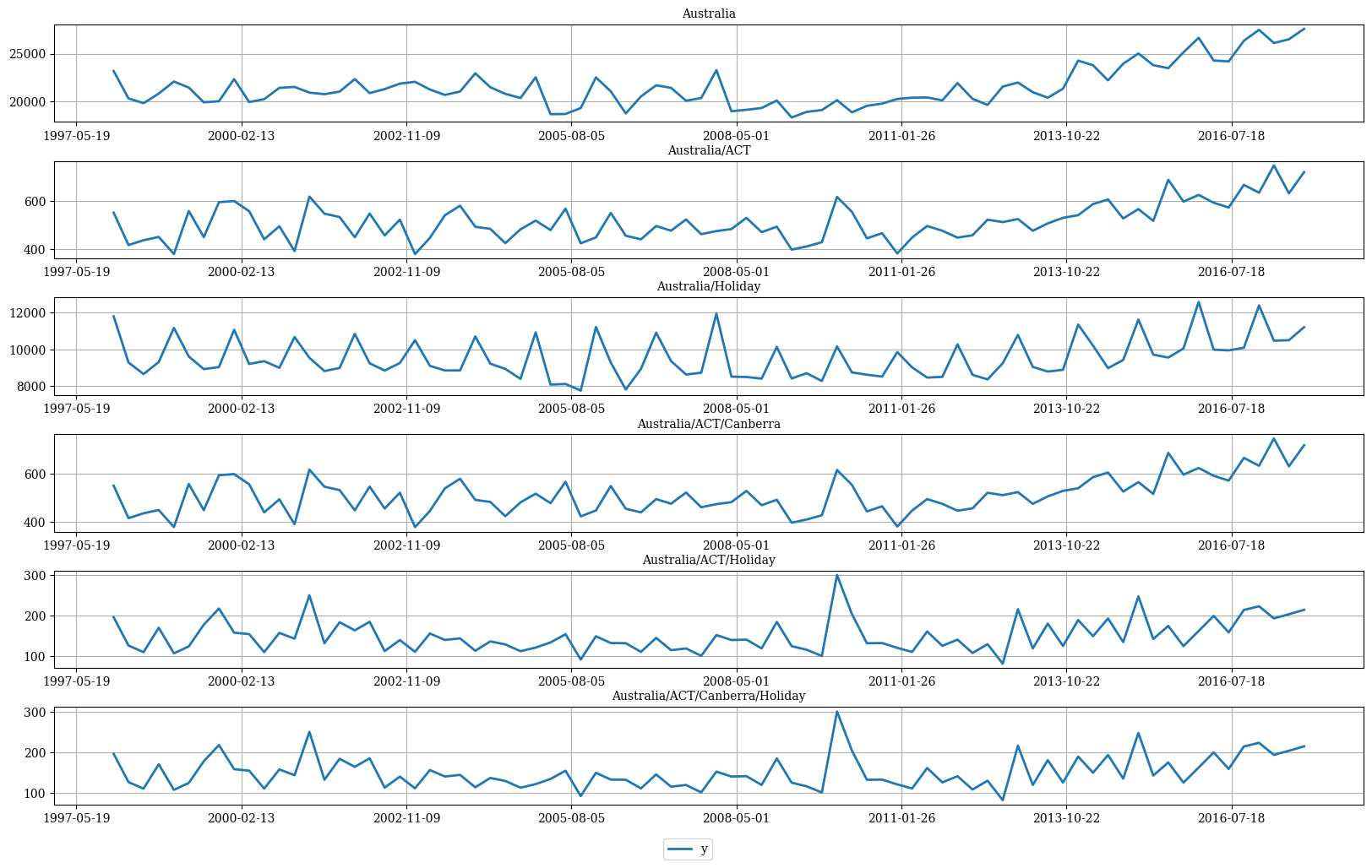
We can visualize the S matrix and the data using the
HierarchicalPlot class as follows.
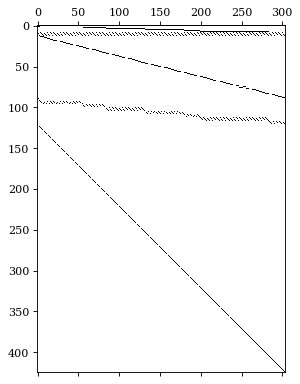
hplot = HierarchicalPlot(S=S_df, tags=tags)
hplot.plot_summing_matrix()
hplot.plot_hierarchically_linked_series(
bottom_series='Australia/ACT/Canberra/Holiday',
Y_df=Y_df
)
Split Train/Test sets
We use the final two years (8 quarters) as test set.
Y_test_df = Y_df.groupby('unique_id', as_index=False).tail(8)
Y_train_df = Y_df.drop(Y_test_df.index)
Y_train_df.groupby('unique_id').size()
unique_id
Australia 72
Australia/ACT 72
Australia/ACT/Business 72
Australia/ACT/Canberra 72
Australia/ACT/Canberra/Business 72
..
Australia/Western Australia/Experience Perth/Other 72
Australia/Western Australia/Experience Perth/Visiting 72
Australia/Western Australia/Holiday 72
Australia/Western Australia/Other 72
Australia/Western Australia/Visiting 72
Length: 425, dtype: int64
Computing base forecasts
The following cell computes the base forecasts for each time series
in Y_df using the AutoARIMA and model. Observe that Y_hat_df
contains the forecasts but they are not coherent. To reconcile the
prediction intervals we need to calculate the uncoherent intervals using
the level argument of StatsForecast.
fcst = StatsForecast(models=[AutoARIMA(season_length=4)],
freq='QS', n_jobs=-1)
Y_hat_df = fcst.forecast(df=Y_train_df, h=8, fitted=True, level=[80, 90])
Y_fitted_df = fcst.forecast_fitted_values()
Reconcile forecasts
The following cell makes the previous forecasts coherent using the
HierarchicalReconciliation class. Since the hierarchy structure is not
strict, we canβt use methods such as TopDown or MiddleOut. In this
example we use BottomUp and MinTrace. If you want to calculate
prediction intervals, you have to use the level argument as follows.
reconcilers = [
BottomUp(),
MinTrace(method='mint_shrink'),
MinTrace(method='ols')
]
hrec = HierarchicalReconciliation(reconcilers=reconcilers)
Y_rec_df = hrec.reconcile(Y_hat_df=Y_hat_df, Y_df=Y_fitted_df,
S_df=S_df, tags=tags, level=[80, 90])
The dataframe Y_rec_df contains the reconciled forecasts.
| unique_id | ds | AutoARIMA | AutoARIMA-lo-90 | AutoARIMA-lo-80 | AutoARIMA-hi-80 | AutoARIMA-hi-90 | AutoARIMA/BottomUp | AutoARIMA/BottomUp-lo-90 | AutoARIMA/BottomUp-lo-80 | β¦ | AutoARIMA/MinTrace_method-mint_shrink | AutoARIMA/MinTrace_method-mint_shrink-lo-90 | AutoARIMA/MinTrace_method-mint_shrink-lo-80 | AutoARIMA/MinTrace_method-mint_shrink-hi-80 | AutoARIMA/MinTrace_method-mint_shrink-hi-90 | AutoARIMA/MinTrace_method-ols | AutoARIMA/MinTrace_method-ols-lo-90 | AutoARIMA/MinTrace_method-ols-lo-80 | AutoARIMA/MinTrace_method-ols-hi-80 | AutoARIMA/MinTrace_method-ols-hi-90 |
|---|
| 0 | Australia | 2016-01-01 | 26212.553553 | 24705.948180 | 25038.715077 | 27386.392029 | 27719.158927 | 24646.517084 | 23983.656843 | 24130.064091 | β¦ | 25267.797338 | 24491.630618 | 24663.064091 | 25872.530586 | 26043.964058 | 26082.753488 | 25010.876141 | 25247.623803 | 26917.883174 | 27154.630835 |
| 1 | Australia | 2016-04-01 | 25033.667125 | 23337.267588 | 23711.954696 | 26355.379554 | 26730.066662 | 22942.957703 | 22229.916838 | 22387.407579 | β¦ | 23836.804444 | 23002.620214 | 23186.868128 | 24486.740760 | 24670.988674 | 24822.102094 | 23616.734393 | 23882.966332 | 25761.237857 | 26027.469796 |
| 2 | Australia | 2016-07-01 | 24507.027198 | 22640.028798 | 23052.396413 | 25961.657983 | 26374.025599 | 22568.286488 | 21805.892199 | 21974.283728 | β¦ | 23294.240908 | 22410.719833 | 22605.864873 | 23982.616942 | 24177.761983 | 24269.578724 | 22944.380043 | 23237.079287 | 25302.078162 | 25594.777406 |
| 3 | Australia | 2016-10-01 | 25598.928613 | 23575.665243 | 24022.547410 | 27175.309816 | 27622.191983 | 23113.075726 | 22308.671860 | 22486.342127 | β¦ | 24154.484487 | 23221.706185 | 23427.730766 | 24881.238208 | 25087.262790 | 25340.549923 | 23905.434070 | 24222.410936 | 26458.688911 | 26775.665777 |
| 4 | Australia | 2017-01-01 | 26982.576796 | 24669.535238 | 25180.421285 | 28784.732308 | 29295.618354 | 23779.264921 | 22874.194227 | 23074.098975 | β¦ | 25155.001372 | 24125.268915 | 24352.707952 | 25957.294793 | 26184.733830 | 26690.200927 | 25051.352698 | 25413.328335 | 27967.073518 | 28329.049155 |
Plot forecasts
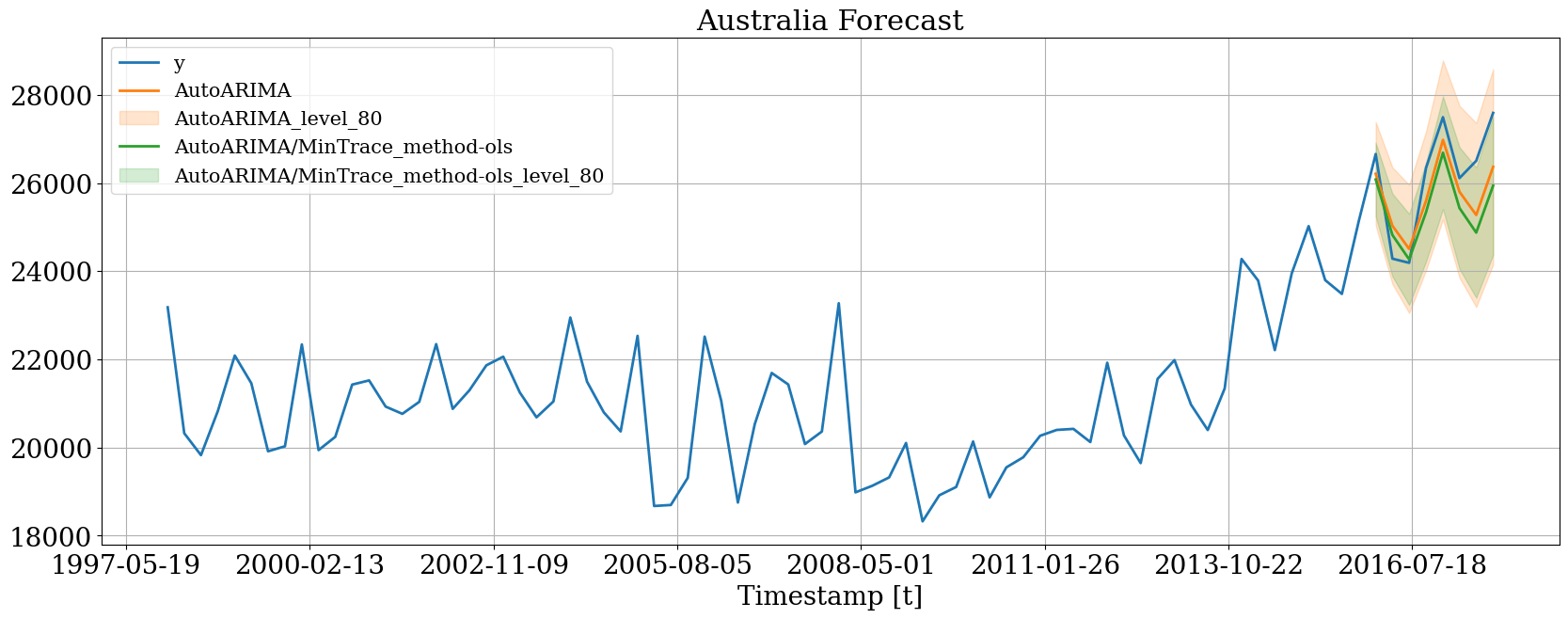
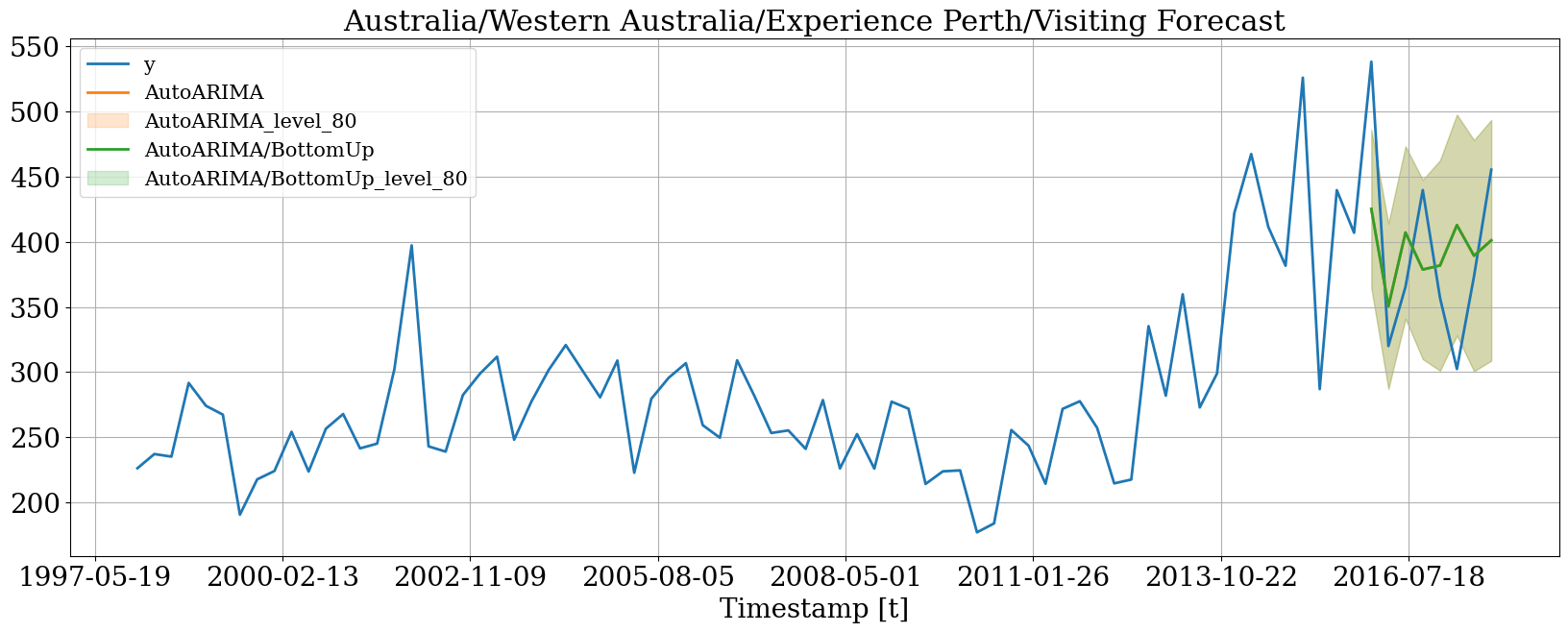
Then we can plot the probabilistic forecasts using the following
function.
plot_df = Y_df.merge(Y_rec_df, on=['unique_id', 'ds'], how="outer")
Plot single time series
hplot.plot_series(
series='Australia',
Y_df=plot_df,
models=['y', 'AutoARIMA', 'AutoARIMA/MinTrace_method-ols'],
level=[80]
)
# Since we are plotting a bottom time series
# the probabilistic and mean forecasts
# are the same
hplot.plot_series(
series='Australia/Western Australia/Experience Perth/Visiting',
Y_df=plot_df,
models=['y', 'AutoARIMA', 'AutoARIMA/BottomUp'],
level=[80]
)
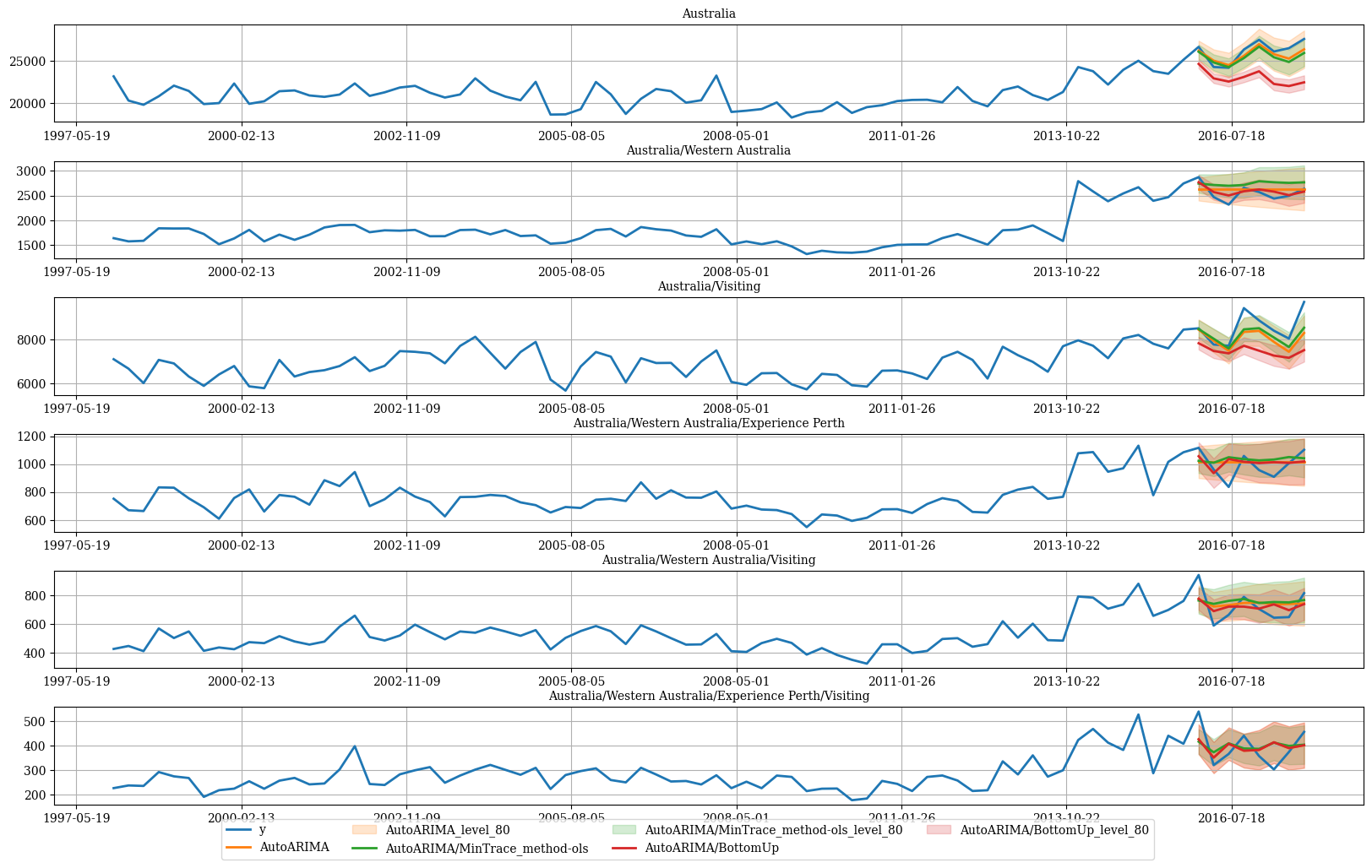
Plot hierarchichally linked time series
hplot.plot_hierarchically_linked_series(
bottom_series='Australia/Western Australia/Experience Perth/Visiting',
Y_df=plot_df,
models=['y', 'AutoARIMA', 'AutoARIMA/MinTrace_method-ols', 'AutoARIMA/BottomUp'],
level=[80]
)
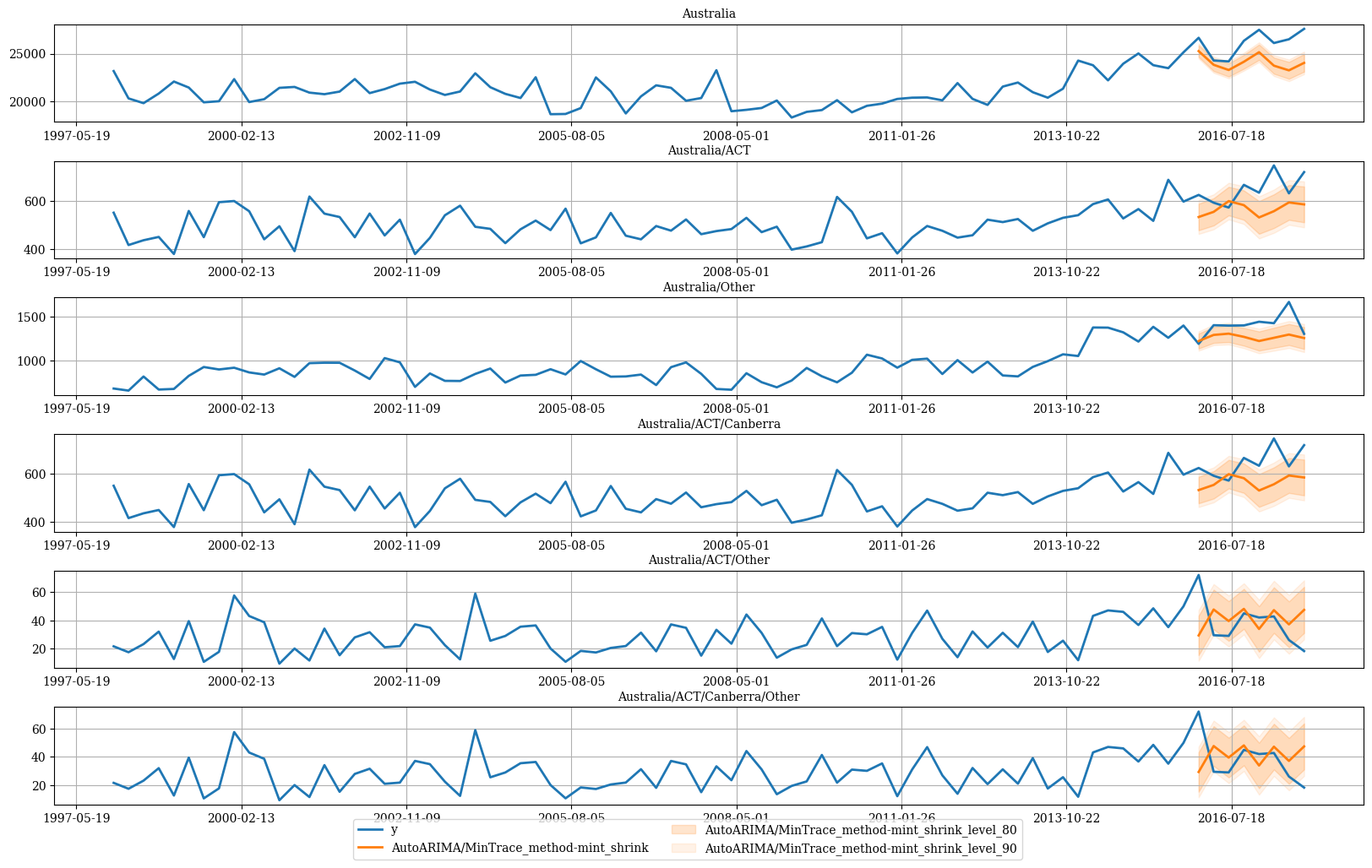
# ACT only has Canberra
hplot.plot_hierarchically_linked_series(
bottom_series='Australia/ACT/Canberra/Other',
Y_df=plot_df,
models=['y', 'AutoARIMA/MinTrace_method-mint_shrink'],
level=[80, 90]
)
References