

NeuralForecast models.
The two methods to consider are:1.
NeuralForecast.save: Saves
models into disk, allows save dataset and config.2.
NeuralForecast.load: Loads models from a given path.Important This Guide assumes basic knowledge on the NeuralForecast library. For a minimal example visit the Getting Started guide.You can run these experiments using GPU with Google Colab.

1. Installing NeuralForecast
2. Loading AirPassengers Data
For this example we will use the classical AirPassenger Data set. Import the pre-processed AirPassenger fromutils.
3. Model Training
Next, we instantiate and train three models:NBEATS, NHITS, and
AutoMLP. The models with their hyperparameters are defined in the
models list.
predict method.
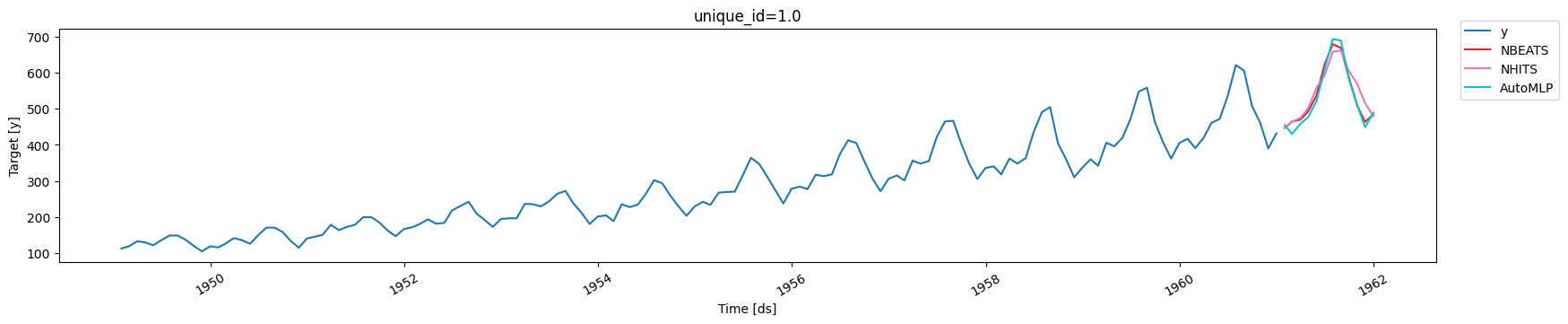
We plot the forecasts for each model.
4. Save models
To save all the trained models use thesave method. This method will
save both the hyperparameters and the learnable weights (parameters).
The save method has the following inputs:
path: directory where models will be saved.model_index: optional list to specify which models to save. For example, to only save theNHITSmodel usemodel_index=[2].overwrite: boolean to overwrite existing files inpath. When True, the method will only overwrite models with conflicting names.save_dataset: boolean to saveDatasetobject with the dataset.
[model_name]_[suffix].safetensors: the learnable weights, with the hyperparameters stored in the file’s metadata header.
configuration.json: theNeuralForecastconfiguration, including which class each checkpoint holds.dataset.jsonanddataset.safetensors: the stored dataset, whensave_dataset=True.
model_name corresponds to the name of the model in lowercase
(eg. nhits). We use a numerical suffix to distinguish multiple models
of each class. In this example the names will be automlp_0,
nbeats_0, and nhits_0.
Important TheAutomodels will be stored as their base model. For example, theAutoMLPtrained above is stored as anMLPmodel, with the best hyparparameters found during tuning.
A note on the artifact format
Directories saved by version 3.3.0 and later hold safetensors weights and JSON metadata, and they are loaded without executing any code they contain. Earlier versions used pickle, which executes arbitrary code contained in the artifact when it is loaded. Reading one of those directories therefore requires you to say so:./old_checkpoints_v2/, leaves the original untouched, and
checks that the result loads with no pickle consent at all. It also
takes a single checkpoint:
python -m neuralforecast.migrate ./NHITS_0.ckpt.
Two cases to be aware of:
- A directory saved with
save_dataset=Trueby an older version must be migrated. Itsdataset.pklstores tensors inside a plain pickle, and there is no way to read that safely. If you would rather not migrate, re-save withsave_dataset=Falseand passdftopredict(). TimeLLMcan no longer be saved or loaded. It resolves itsllmargument throughfrom_pretrainedwhile being constructed, so an artifact could direct that fetch. Train and predict with it in the same process.
Loading from remote storage
load refuses non-local paths unless you opt in:
Custom losses, optimizers and schedulers
Class names inside an artifact are resolved through a closed registry, so anything the library does not ship has to be registered before it can be saved:- Registration has to run in the process that loads, too, not only the one that saves. The artifact stores the registered name; the class itself comes from your code.
- Any
nn.Modulecan be registered as a loss. One that does not inherit a neuralforecast loss base has no recorded constructor arguments, so they are recovered from the object and checked by rebuilding it when you save. If the rebuild would differ, saving fails rather than writing an artifact that loads as a different loss.
load additionally accepts
the same four arguments, to replace what an artifact stored — useful
when the stored class is no longer importable, or when you want to swap
it:
load also
accepts map_location, and rejects anything else rather than ignoring
it.
What is not carried in an artifact
Some settings describe the run rather than the model, and are dropped on save or on load with a warning naming them. Set them on the loaded object if you want them back.- Callbacks are dropped on save, as in earlier versions. Early
stopping is rebuilt from
early_stop_patience_steps, so that keeps working. Re-attach others withmodel.trainer_kwargs['callbacks'] = [...]. - A
loggerinstance is dropped;logger=Falseis kept, since it is configuration rather than an object. - Trainer and DataLoader settings that belong to the machine —
default_root_dir,strategy,num_nodes,profiler,num_workers,prefetch_factor,multiprocessing_context— are not restored from an artifact, because a file should not choose where checkpoints are written or how many processes are spawned on the host loading it. - Anything that needs pickle to serialize, such as a
worker_init_fnindataloader_kwargsor anlr_lambdainlr_scheduler_kwargs, is dropped on save with a warning. A model argument that cannot be encoded is an error instead, so a model never silently reloads without its loss.
5. Load models
Load the saved models with theload method, specifying the path, and
use the new nf2 object to produce forecasts.
Finally, plot the forecasts to confirm they are identical to the
original forecasts.
