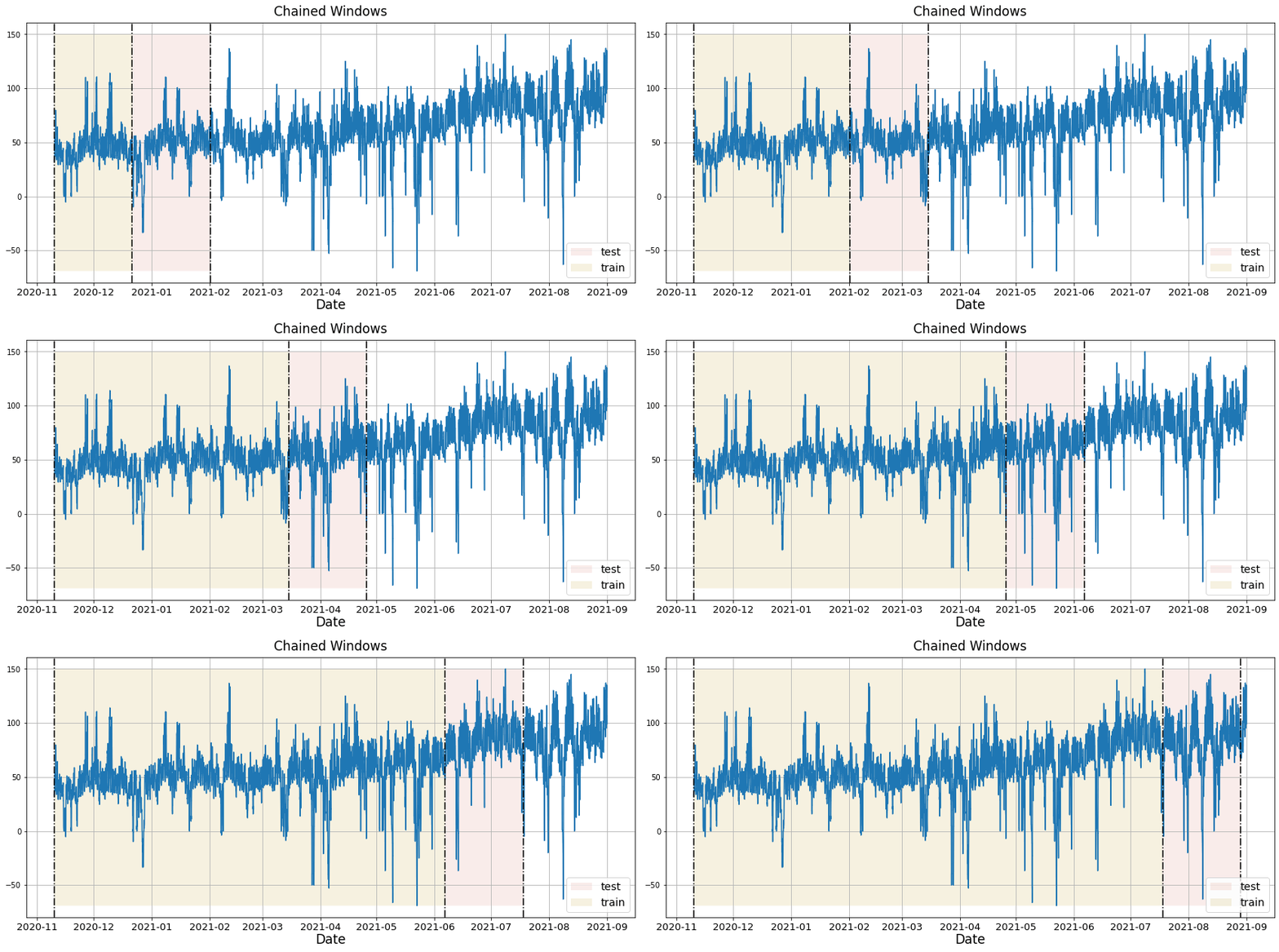
Implement cross-validation to evaluate models on historical dataTime series cross-validation is a method for evaluating how a model would have performed on historical data. It works by defining a sliding window across past observations and predicting the period following it. It differs from standard cross-validation by maintaining the chronological order of the data instead of randomly splitting it. This method allows for a better estimation of our model’s predictive capabilities by considering multiple periods. When only one window is used, it resembles a standard train-test split, where the test data is the last set of observations, and the training set consists of the earlier data. The following graph showcases how time series cross-validation works.
 In this tutorial we’ll explain how to perform cross-validation in
NeuralForecast.
Outline: 1. Install NeuralForecast
- Load and plot the data
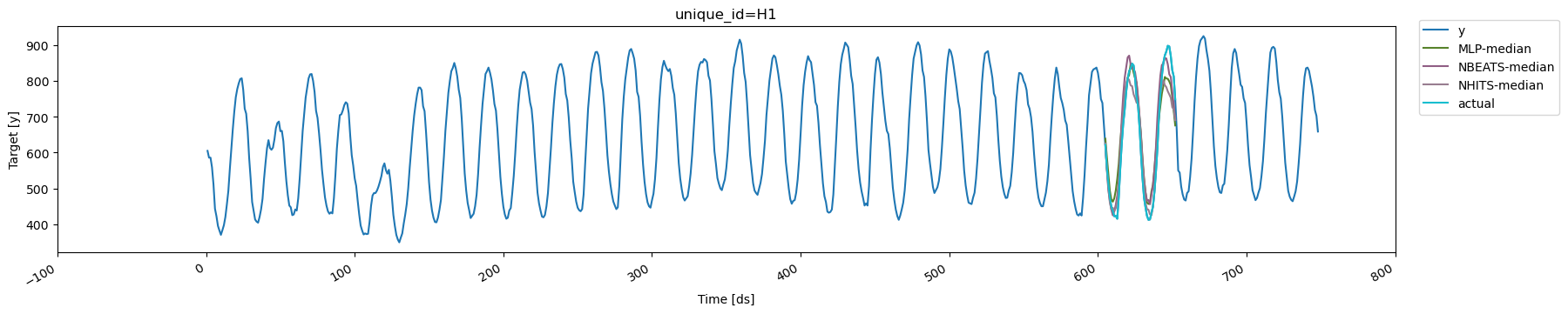
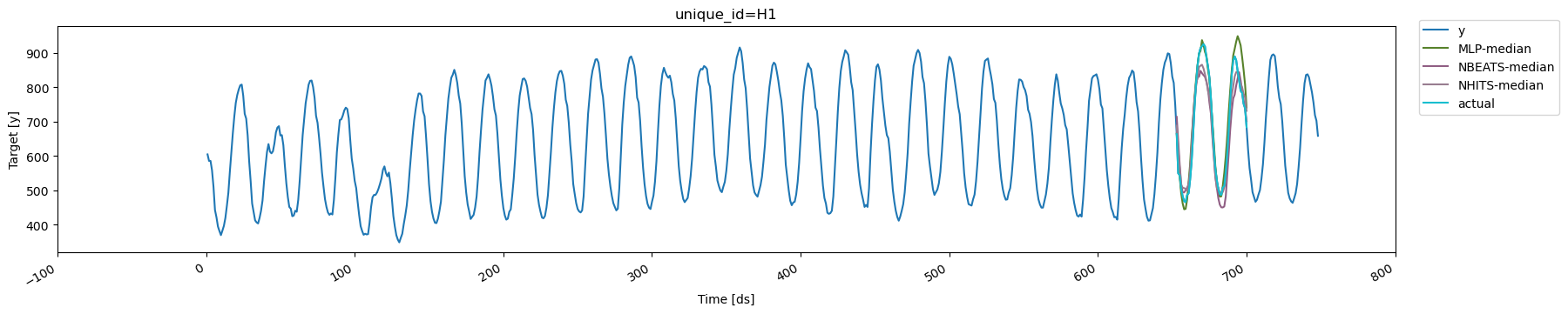
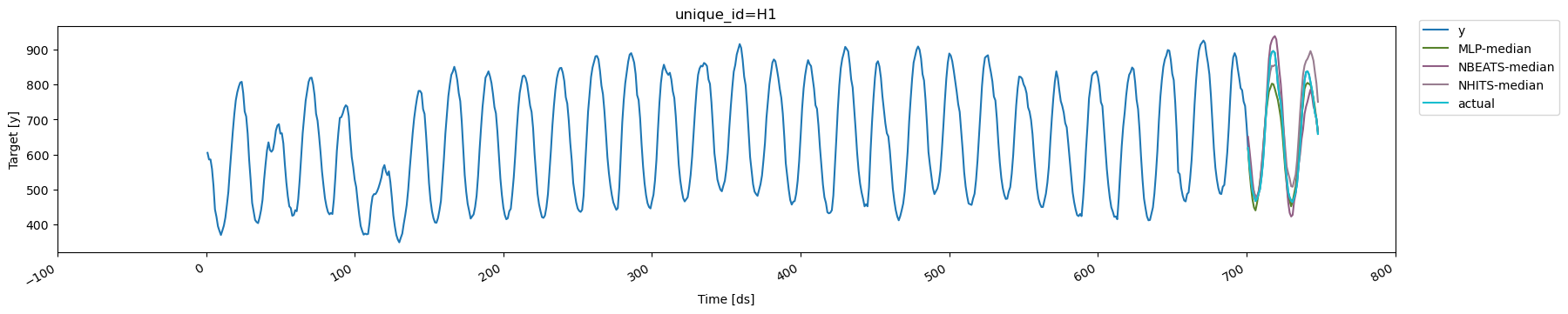
- Train multiple models using cross-validation
- Evaluate models and select the best for each series
- Plot cross-validation results
Prerequisites
This guide assumes basic familiarity with neuralforecast. For a
minimal example visit the Quick
Start
1. Install NeuralForecast
2. Load and plot the data
We’ll use pandas to load the hourly dataset from the M4 Forecasting Competition, which has been stored in a parquet file for efficiency.
The input to
neuralforecast should be a data frame in long format with
three columns: unique_id, ds, and y.
-
unique_id(string, int, or category): A unique identifier for each time series. -
ds(int or timestamp): An integer indexing time or a timestamp in format YYYY-MM-DD or YYYY-MM-DD HH:MM:SS. -
y(numeric): The target variable to forecast.
plot_series method from
utilsforecast.plotting. utilsforecast is a dependency of
neuralforecast so it should be already installed.
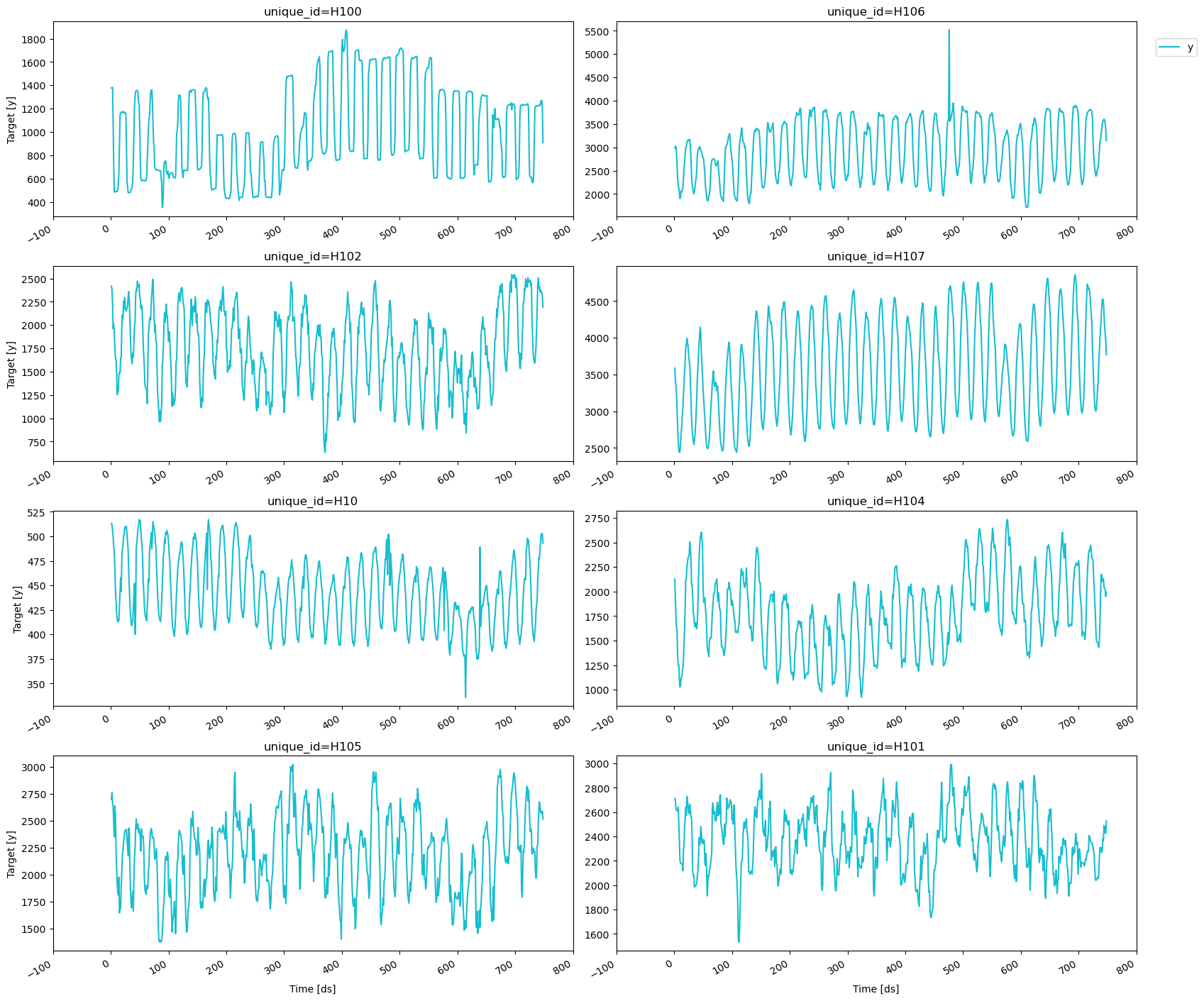
3. Train multiple models using cross-validation
We’ll train different models fromneuralforecast using the
cross-validation method to decide which one perfoms best on the
historical data. To do this, we need to import the NeuralForecast
class and the models that we want to compare.
neuralforecast's
MPL,
NBEATS, and
NHITS models.
First, we need to create a list of models and then instantiate the
NeuralForecast class. For each model, we’ll define the following
hyperparameters:
-
h: The forecast horizon. Here, we will use the same horizon as in the M4 competition, which was 48 steps ahead. -
input_size: The number of historical observations (lags) that the model uses to make predictions. In this case, it will be twice the forecast horizon. -
loss: The loss function to optimize. Here, we’ll use the Multi Quantile Loss (MQLoss) fromneuralforecast.losses.pytorch.
Warning The Multi Quantile Loss (MQLoss) is the sum of the quantile losses for each target quantile. The quantile loss for a single quantile measures how well a model has predicted a specific quantile of the actual distribution, penalizing overestimations and underestimations asymmetrically based on the quantile’s value. For more details see here.While there are other hyperparameters that can be defined for each model, we’ll use the default values for the purposes of this tutorial. To learn more about the hyperparameters of each model, please check out the corresponding documentation.
cross_validation method takes the following arguments:
-
df: The data frame in the format described in section 2. -
n_windows(int): The number of windows to evaluate. Default is 1 and here we’ll use 3. -
step_size(int): The number of steps between consecutive windows to produce the forecasts. In this example, we’ll setstep_size=horizonto produce non-overlapping forecasts. The following diagram shows how the forecasts are produced based on thestep_sizeparameter and forecast horizonhof a model. In this diagramstep_size=2andh=4.
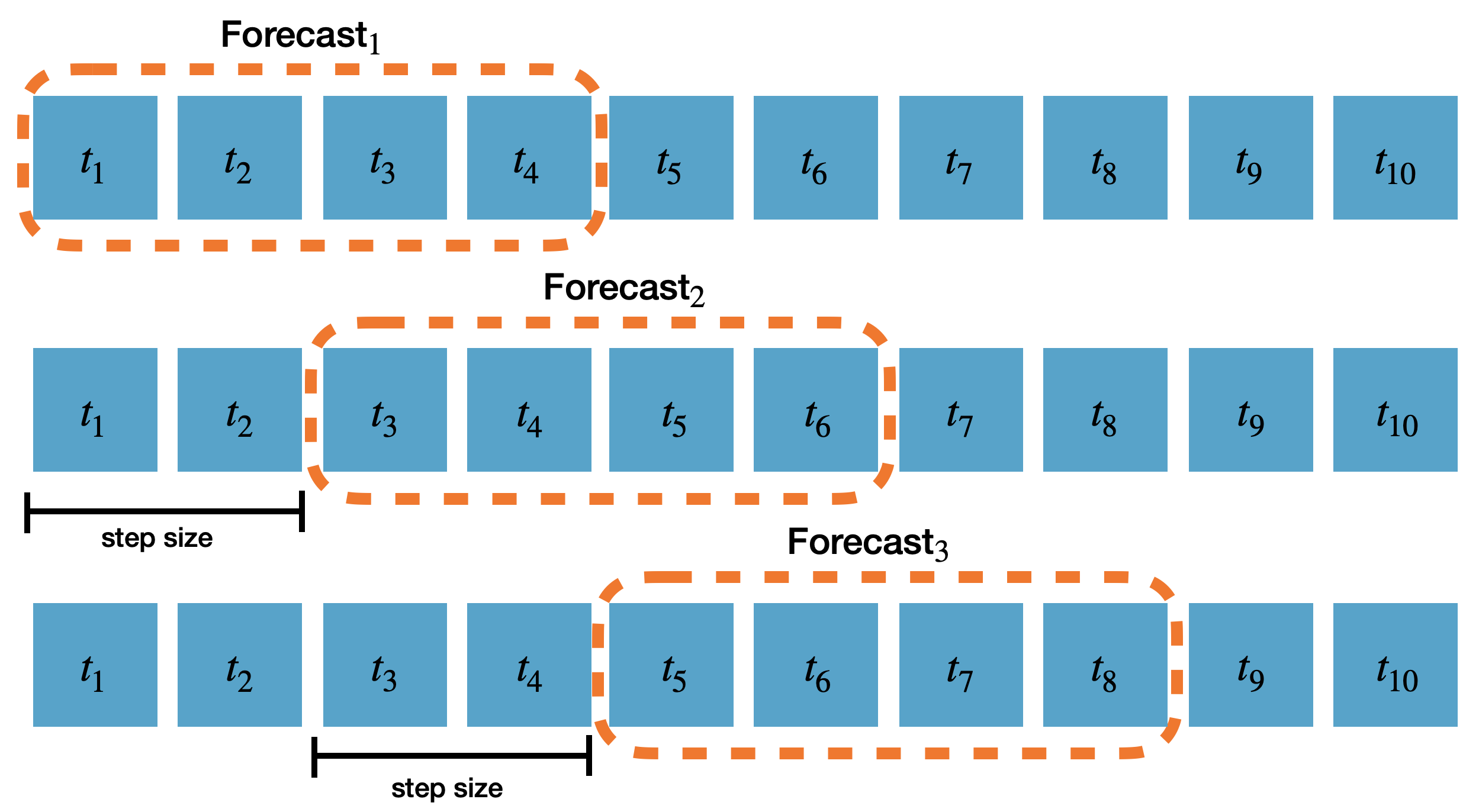
refit(bool or int): Whether to retrain models for each cross-validation window. IfFalse, the models are trained at the beginning and then used to predict each window. If a positive integer, the models are retrained everyrefitwindows. Default isFalse, but here we’ll userefit=1so that the models are retrained after each window using the data with timestamps up to and including the cutoff.
cross_validation
method in neuralforecast diverges from other libraries, where models
are typically retrained at the start of each window. By default, it
trains the models once and then uses them to generate predictions over
all the windows, thus reducing the total execution time. For scenarios
where the models need to be retrained, you can use the refit parameter
to specify the number of windows after which the models should be
retrained.
The output of the
cross-validation method is a data frame that
includes the following columns:
-
unique_id: The unique identifier for each time series. -
ds: The timestamp or temporal index. -
cutoff: The last timestamp or temporal index used in that cross-validation window. -
"model": Columns with the model’s point forecasts (median) and prediction intervals. By default, the 80 and 90% prediction intervals are included when using the MQLoss. -
y: The actual value.
4. Evaluate models and select the best for each series
To evaluate the point forecasts of the models, we’ll use the Root Mean Squared Error (RMSE), defined as the square root of the mean of the squared differences between the actual and the predicted values. For convenience, we’ll use theevaluate and the rmse functions from
utilsforecast.
evaluate function takes the following arguments:
-
df: The data frame with the forecasts to evaluate. -
metrics(list): The metrics to compute. -
models(list): Names of the models to evaluate. Default isNone, which uses all columns after removingid_col,time_col, andtarget_col. -
id_col(str): Column that identifies unique ids of the series. Default isunique_id. -
time_col(str): Column with the timestamps or the temporal index. Default isds. -
target_col(str): Column with the target variable. Default isy.
models, then we need to
exclude the cutoff column from the cross-validation data frame.
We can summarize the results to see how many times each model won.
With this information, we now know which model performs best for each
series in the historical data.
5. Plot cross-validation results
To visualize the cross-validation results, we will use theplot_series
method again. We’ll need to rename the y column in the
cross-validation output to avoid duplicates with the original data
frame. We’ll also exclude the cutoff column and use the
max_insample_length argument to plot only the last 300 observations
for better visualization.
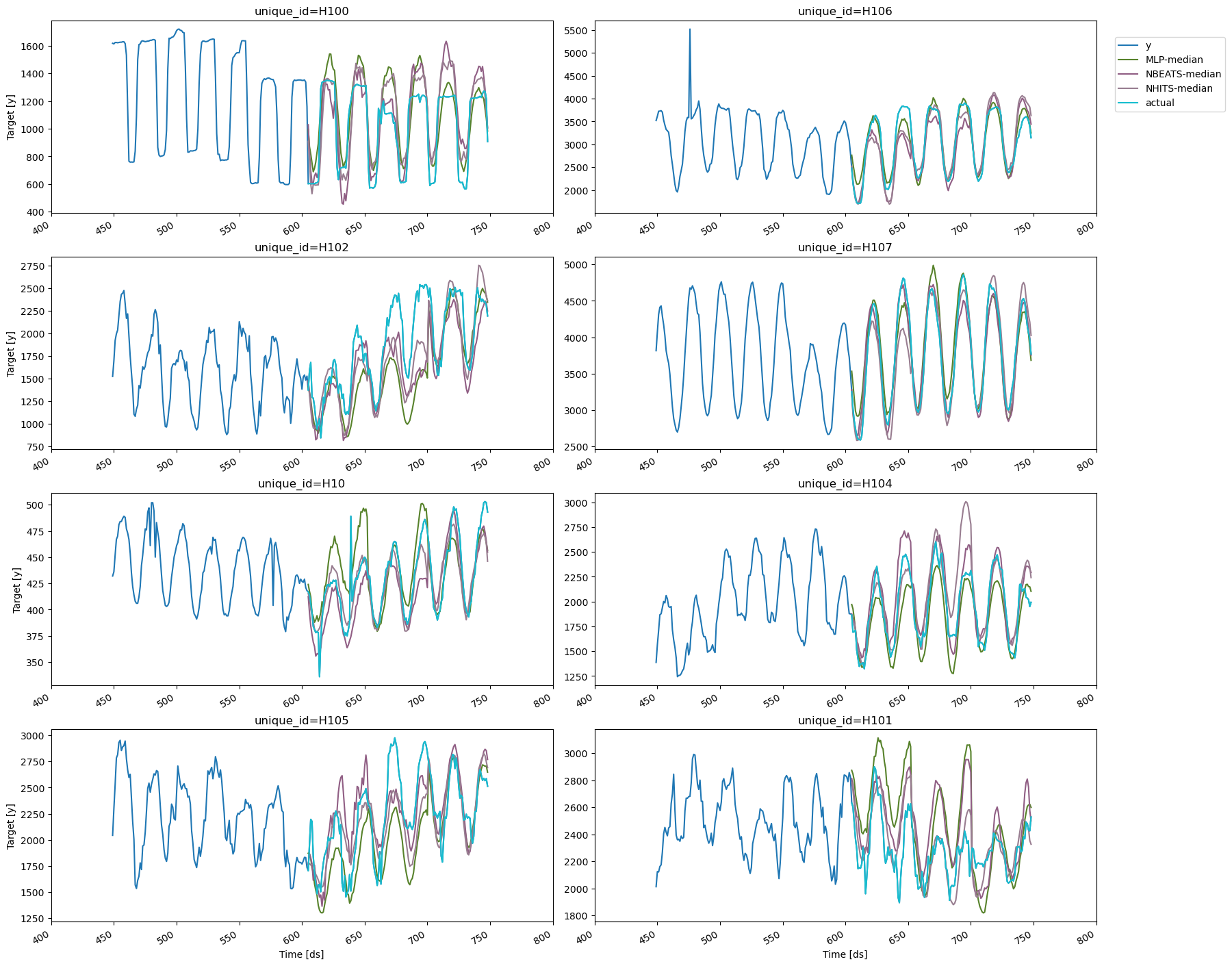
unique_id='H1'.
There are three cutoffs because we set n_windows=3. In this example,
we used refit=1, so each model is retrained for each window using data
with timestamps up to and including the respective cutoff. Additionally,
since step_size is equal to the forecast horizon, the resulting
forecasts are non-overlapping